
I’m still conducting my experiment with using my terminal as much as I can, though that’s become terminal plus GitHub.com since my GitHub workflow still works best in a browser, unfortunately.
As I’ve been spending much of my time in the terminal, one gap I noticed was that I didn’t have a way to interact with Beeminder in the terminal.
(If somehow you’re reading this and don’t know what Beeminder is, it’s a fantastic service that lets you set monetary stakes on making ongoing progress toward your goals.)
Other terminal interfaces for Beeminder exist, but none of them were exactly what I was hoping for. So I decided to build my own.
I had previously built a custom Beeminder dashboard for the browser–you can use it yourself at bm.taskratchet.com. I really enjoy having the tight grid of color-coded goal cells. It’s very information dense and works well for my brain. So I decided to build the same thing as a TUI.
It seems that the best TUI libraries are all written in Go. I don’t know how to write Go, but that proved to be not a problem at all. I used GitHub Copilot coding agent tasks to build the whole thing, and the experience was really fantastic. Copilot brought a lot of polish and attention to detail to the project that I may not have had time for if I had written it on my own.
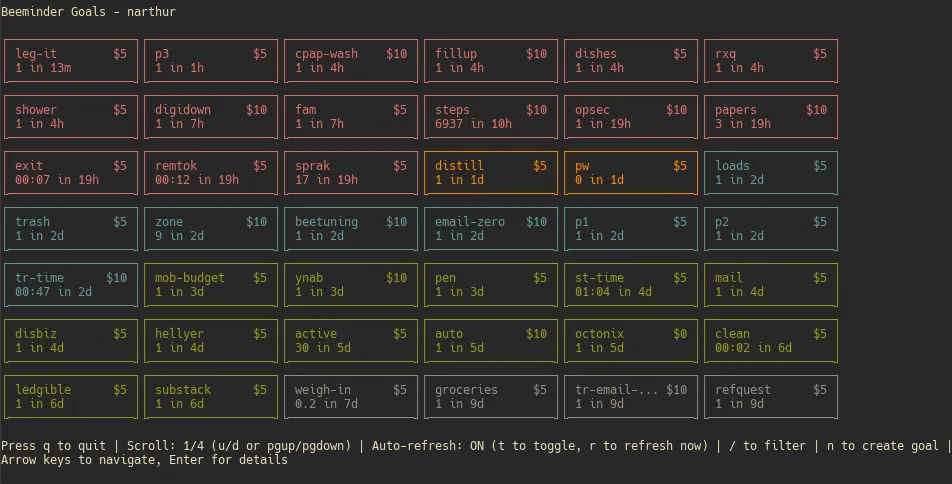
The TUI portion of the tool is pretty simple. When you first run buzz (assuming you’ve already authed) it displays a grid of your goals, color-coded by buffer–red for due today, orange for due tomorrow, etc. You can scroll to see all your goals if they don’t fit in your terminal. And you can use your arrow keys to highlight one of the cells.
Once the cell is highlighted, you can press enter to open the detail view for this goal. It shows some details about the goal and lets you enter a data point if you’d like.
The detail view is functional, but I rarely use it, since I’ve found a slightly different workflow to be much more efficient. I open the grid of goals by using buzz without arguments, and then I also open a separate terminal pane where I actually interact with the goals, with commands such as:
buzz todayto get a list of all the goals needing data today (also useful for copying to a notes app for a handy checklist)buzz nextto see just the next due goalbuzz add the_slug 1 and an optional commentto add data
This hybrid approach has proven super efficient and enjoyable for me.
So far I’m quite happy with the tool as is. There are some fun features that my web dashboard had that this doesn’t, but at least for now I’m not planning to introduce them unless I start missing them (or other people request them).
It’s also super easy to install. My preferred method is using bin since I already enjoy using bin and it makes it very simple to update buzz. But you can also install it using Homebrew, which is probably an easier option for most Mac users.
Here’s the repo. Give it a go and let me know what you think, or just create a PR or an issue on GitHub.
Disclosure: AI didn’t write any of this, but I did use Claude to get feedback on my writing.